Introduction Why Cloud Data Integration Is Business Critical
When you hear cloud data integration people often think just move data to the cloud. € It’s far more than a lift and shift. It’s the glue that lets sales, finance, and product teams work off the same, up to date information. Companies that sync their data in real time see up to 30% faster decision cycles and a measurable lift in revenue. And if you’re still running batch jobs at midnight, you’re already losing ground.
In 2026 the pressure is on to blend on premises sources with SaaS apps, AI feeds, and IoT streams. That’s why a solid integration strategy feels like a business critical lifeline rather than an IT afterthought.
Types of Cloud Data Integration Approaches
There’s no one size fits all. Most organizations juggle three core styles:
- Batch integration scheduled moves, usually nightly or hourly.
- Event driven integration triggers fire as soon as data changes, ideal for inventory alerts or fraud detection.
- Hybrid integration combines batch and event driven flows while keeping some workloads on premise for latency or compliance reasons.
Choosing the right mix depends on latency tolerances, data volume, and the regulatory landscape you operate in.
iPaaS vs Custom Integration Pros and Cons
Now let’s talk iPaaS data integration versus building your own pipelines. Both paths have fans, but the trade offs are stark.
iPaaS Advantages
- Quick to spin up you can connect a CRM to a data lake in under a day.
- Managed security patches and compliance updates.
- Predictable subscription pricing good for budgeting.
iPaaS Drawbacks
- Limited deep customization complex transformations may hit a wall.
- Vendor lock in risks moving to a new platform can be pricey.
- Performance caps on high throughput streams.
Custom Integration Benefits
- Full control over logic, error handling, and performance tuning.
- Can be optimized for ultra low latency, important for trading or autonomous vehicles.
- Usually fits a scalable data integration platform architecture you design yourself.
Custom Integration Challenges
- Requires skilled engineers hiring can be a bottleneck.
- Maintenance overhead skyrockets as you add more connectors.
- Security compliance is all on you, not the vendor.
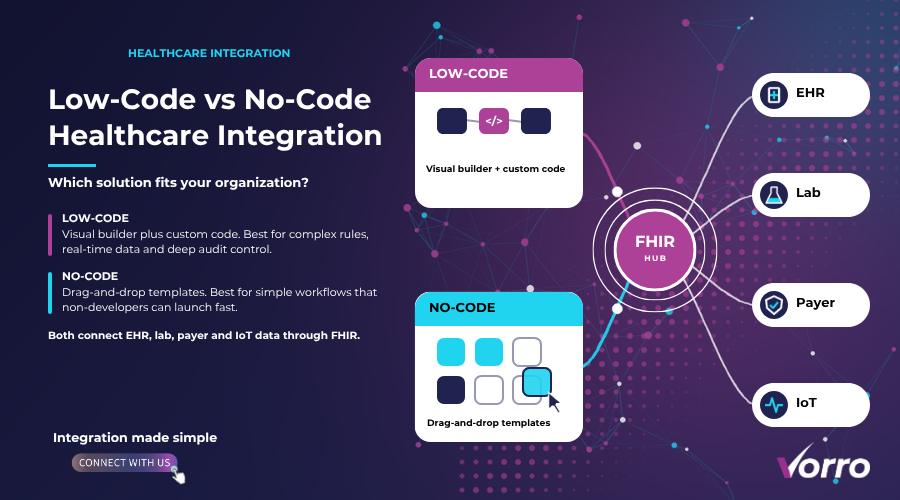
In practice, many firms adopt a mixed model: use iPaaS for standard SaaS to cloud flows and custom code for mission critical, high velocity pipelines.
Top Cloud Data Integration Tools in 2026
Here’s the lineup I rely on when a client asks, What should I buy? € The list reflects fresh releases and major upgrades launched this year.
Informatica Intelligent Cloud Services
Informatica still leads on breadth. Its AI powered mapping engine reduces manual mapping time by 40%. The tool offers both subscription and consumption based licensing, giving you flexibility as workloads spike.
IBM Cloud Pak for Integration
IBM’s offering shines in hybrid environments. It bundles API management, messaging, and event streaming into a single console, which makes governance less of a headache.
Oracle Integration Cloud
Oracle leverages its massive SaaS ecosystem. If you’re already on Oracle ERP or NetSuite, the pre built adapters cut integration effort in half.
SnapLogic
SnapLogic’s visual designer feels like a drag and drop canvas, but under the hood it runs on a scalable data integration platform built on Kubernetes. That means you can auto scale during holiday sales peaks.
MuleSoft Anypoint Platform
MuleSoft remains a favorite for large enterprises needing fine grained API governance. Its runtime engine supports both cloud and on prem deployments perfect for hybrid data integration.
Fivetran
If you just want out of the box connectors and zero maintenance pipelines, Fivetran delivers. It charges per connector per month, which is easy to forecast for small teams.
Airbyte
Open source and rapidly maturing, Airbyte lets you cobble together custom connectors without vendor lock in. It now offers a managed cloud service for teams that need the best of both worlds.
Across the board, you’ll notice a shift toward serverless execution and built in observability two trends that drive lower ops costs and faster issue resolution.
Real-Time Cloud Integration Architecture
So how does a real-time cloud integration pipeline actually look? Picture this: a change in Salesforce fires a webhook, which lands on an event bus like Apache Kafka or Azure Event Hubs. From there, a lightweight function (AWS Lambda or Azure Functions) transforms the payload and drops it into a Snowflake table. A downstream analytics dashboard lights up within seconds.
Key components you’ll need:
- Event source webhooks, CDC agents, or IoT edge devices.
- Message broker guarantees at least once delivery and decouples producers from consumers.
- Processing layer serverless functions or stream processing frameworks (Flink, Beam).
- Destination stores data warehouses, operational databases, or downstream SaaS apps.
- Monitoring stack built in metrics, alerting via Prometheus or CloudWatch, and a trace UI like OpenTelemetry.
Because each piece can autoscale, latency stays under 500 ms even when you’re pushing 2 million events per hour. That’s the sweet spot for fraud detection or inventory replenishment.
Scaling Your Integration Strategy as Your Data Grows
Data volume isn’t static; it explodes as you add more sources and users. Here are three tactics I’ve seen work time and again.
Partition Your Data Streams
Don’t shove everything through a single topic. Break it out by business domain or geography. That lets you allocate more compute to hot streams and keeps downstream systems from choking.
Adopt a Micro service Integration Layer
Instead of a monolithic ETL engine, spin up independent integration services for each domain. Each service can be versioned, scaled, and deployed without touching the others.
Leverage Consumption Based Pricing
If your vendor offers pay as you go pricing, you’ll avoid surprise caps. Pair that with auto scaling functions and you only pay for the compute you actually use.
Monitor key KPIs throughput, latency, error rate and set automated scaling policies. That way you never have to manually intervene when traffic spikes during a product launch.
Cost Optimization Strategies for Cloud Integration Projects
Now for the part everyone’s nervous about: cost. A well designed integration can save you 20% 40% over a legacy approach, but you have to be intentional.
- Right size your compute. Use spot instances for non critical batch jobs. For real time functions, choose the smallest memory allocation that meets latency targets.
- Consolidate connectors. Many iPaaS vendors charge per connector. Group related data sources under a single hub € connector where possible.
- Turn off idle pipelines. Schedule nightly jobs to pause during off hours if you’re not processing 24/7 data.
- Use data lifecycle policies. Archive cold data to cheaper storage tiers after 30 days; this reduces query costs on Snowflake or Redshift.
- Negotiate enterprise contracts. If you foresee multi year usage, vendors often give volume discounts on subscription rates.
Tracking spend in a dedicated dashboard helps you spot spikes before they balloon into overruns.
Real-World Case Studies Successes & Lessons Learned
Let me walk you through two recent projects.
Global Retailer Reduces Stockouts by 15%
We integrated Shopify, SAP ERP, and a third party logistics API using a mix of SnapLogic for the SaaS connectors and custom Kafka streams for inventory updates. The real time pipeline cut the stockout detection € window from 4 hours to 30 seconds. The ROI broke even after six months thanks to higher sales and lower emergency freight costs.
Financial Services Firm Hits Compliance Milestones
A bank needed to synchronize customer data across on premise core banking, Azure SQL, and a new AI risk engine. We chose IBM Cloud Pak for Integration because its built in data masking and policy enforcement met the strict GDPR and CCAR rules. The team learned that early involvement of the compliance group saved three months of re work.
Both stories underscore the importance of picking the right tool for the job and involving stakeholders early.
Future Trends in AI Integration and Serverless Pipelines
What’s on the horizon? Two big shifts are already reshaping the landscape.
AI Assisted Mapping
Next gen iPaaS platforms are embedding large language models to suggest schema mappings automatically. This cuts the manual effort of data modeling by up to 60% and lets business analysts prototype pipelines without a developer.
Serverless End to End Pipelines
Instead of provisioning VMs for each stage, you’ll see fully serverless end to end flows. Data lands in an event hub, a series of Functions apply transformations, and the result lands in a lake all without touching a single server. Billing becomes truly consumption based, and you gain near infinite elasticity.
Keep an eye on emerging standards like CloudEvents 2.0 and the growing ecosystem of open source connectors that promise to lower lock in risk.
FAQs
What distinguishes cloud data integration from traditional ETL?
Traditional ETL often runs in batch on-premise servers, while cloud data integration emphasizes elasticity, real time processing, and SaaS native connectors.
Is iPaaS the right choice for highly regulated industries?
It can be, provided the vendor offers strong data governance, encryption at rest and in transit, and audit logs that meet industry standards.
How do I ensure low latency in a multi cloud environment?
Use regional event hubs, keep processing close to the data source, and employ edge functions where possible. Monitoring latency per hop helps you spot bottlenecks fast.
What licensing model should I pick?
Subscription works well for predictable workloads. Consumption based pricing shines when you have variable spikes, especially with serverless pipelines.
Can I migrate existing on premise pipelines to the cloud without rewriting them?
Often you can lift and shift using tools like Azure Data Factory’s integration runtime or AWS DMS. For complex transformations, consider re architecting to a cloud native serverless model for long term benefits.
Now that you’ve got the full picture, you can decide whether to double down on an iPaaS, build a custom scalable data integration platform, or blend the two. The right mix will give you faster insights, tighter security, and a clear path to future growth. Go ahead-start mapping those data flows today and watch your business accelerate.