Introduction
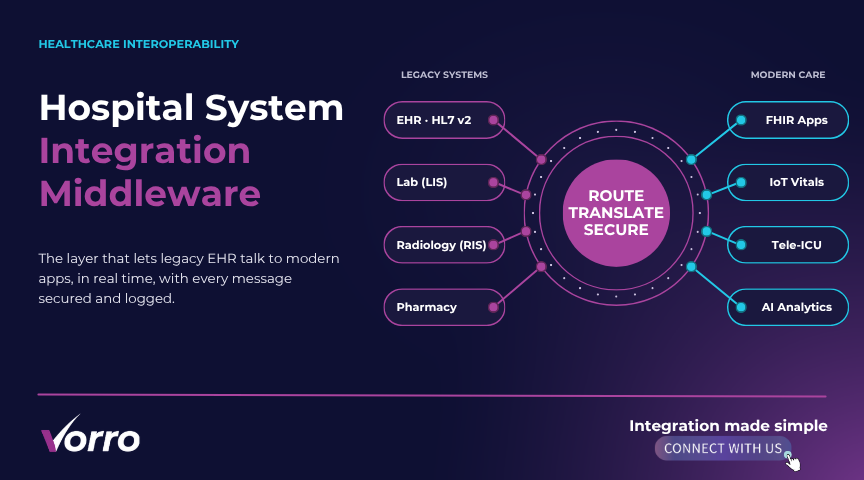
If you’ve been wrestling with a clunky, aging integration engine in your hospital’s IT stack, you’re not alone. The push for integration modernization isn’t just buzz—it’s a survival tactic when you’re handling millions of HL7 messages a day. In this guide I’ll walk you through the exact steps to migrate integration engine workloads without blowing your budget or breaking compliance.
We’ll cover everything from spotting the red flags in a legacy system to building a rock?solid ROI case that executives can actually understand. And yes, I’ll sprinkle real?world examples from a regional health system that replaced its integration engine in under eight months.
Signs Your Legacy Engine Is Holding You Back
Performance bottlenecks
Do you still see spikes of latency during peak admission hours? That’s a classic symptom of a legacy engine straining under today’s data volume. In one study, a 30?bed community hospital saw a 45% increase in message turnaround time after a single software upgrade. If you’re experiencing similar slowdowns, it’s time to consider a move.
Support and vendor lock?in
When the vendor’s support desk disappears after a “sunset” notice, you’re left scrambling for workarounds. I’ve watched IT teams spend weeks writing custom patches just to keep an old engine running. Those patches add risk, cost, and a nasty knowledge?transfer headache.
And the longer you cling to that vendor, the deeper the technical debt becomes. The sooner you replace integration engine components, the easier the future upgrades will be.
Security and compliance gaps
Healthcare data is a prime target, yet many legacy engines lack modern encryption or audit trails. A recent breach at a midsize clinic traced back to an unpatched integration module—something you could have avoided with an updated platform. If you can’t demonstrate HIPAA?aligned logs, regulators will knock on your door.
Scalability roadblocks
Planning a tele?ICU rollout? Your old engine might choke on the extra load. Scalability isn’t just about “more servers”; it’s about a flexible architecture that can spin up new routes on demand. Without that, you’ll spend months re?architecting for every new service.
Planning the Migration
Assessing your current architecture
Start with a detailed technical audit: catalog every inbound and outbound interface, list the message standards (HL7 v2, FHIR, CCD), and map out data transformation rules. In our “replatforming healthcare” project, we discovered 27 hidden adapters that no one remembered building.
Now you have a baseline to compare against the target platform.
Defining business and technical requirements
Talk to clinicians, billing, and analytics teams. Ask “What would you do if the interface never failed?” Their answers shape SLAs, throughput targets, and the need for real?time alerts. I always capture requirements in a living spreadsheet that both IT and business owners can edit.
Remember to embed compliance checkpoints—HIPAA, GDPR for any EU patients, and state?level privacy rules.
Selecting the right target engine
Cloud?native versus on?premise? The decision hinges on your data?residency policy and budget. A cloud engine often offers auto?scaling and built?in monitoring, while on?premise solutions provide tighter control for ultra?sensitive data. My recommendation? Pilot a hybrid model for six weeks—run the new engine in the cloud for non?PHI traffic while keeping PHI on?premise.
Risk assessment and mitigation
Every migration carries risk, but you can blunt it with a layered approach. Identify high?impact interfaces, assign a risk score, and develop fallback plans. In one case, a “big?bang” cutover caused a two?hour outage because the team missed a single routing rule. A phased approach saved that organization from a weekend nightmare.
Avoiding Downtime and Data Loss
Coexistence and parallel run strategies
Running the old and new engines side?by?side is the safest way to catch hidden errors. Set up a parallel run for a low?risk interface—like patient?portal notifications—and compare logs in real time. When the results match, you can expand the scope.
But don’t forget to automate the data recon?ciliation; manual checks become a bottleneck fast.
Data mapping and validation
Data transformation is where most bugs hide. Use a schema?validation tool to ensure every field maps correctly from source to target. In my recent legacy engine migration for a tertiary hospital, automated validation cut testing time by 60%.
Testing across the spectrum
Unit tests verify individual transforms; integration tests confirm end?to?end flows; load tests push the engine to 150% of peak traffic; regression tests ensure nothing that worked before now breaks. I always embed performance thresholds—like “95th percentile latency under 200?ms”—into the CI pipeline.
ROI and Cost?Benefit Analysis
Decision makers love numbers. Build a simple template: calculate total cost of ownership for the legacy engine (support contracts, overtime, missed revenue from downtime) and compare it to the projected cost of the new platform (license, cloud spend, migration services). In a recent case, the new engine shaved $420?k off annual support fees and reduced average interface error rate from 4.2% to 0.3%—a clear win.
Now you have a story that finance can sell.
Regulatory and Data?Privacy Compliance Checklist
Every migration must pass a compliance gate. Start with a data?classification inventory—label PHI, PII, and less?sensitive data. Then verify that the target engine supports at?rest encryption, TLS?1.3 in transit, and comprehensive audit logging. Don’t forget to document consent management for any patient?generated data.
And run a mock audit after the pilot phase; it’s easier to fix missing logs now than during a real regulator visit.
Post?Migration Performance Monitoring
Going live is just the beginning. Implement a dashboard that tracks message volume, error rates, and latency in real time. Set alerts for any metric that breaches your SLA—say, error rate >0.5% for five minutes. Continuous improvement isn’t optional; it’s how you prove the migration delivered value.
In practice, I’ve seen teams that neglect this step fall back into “set?and?forget” mode and slowly drift back toward the same problems they tried to escape.
A Step?by?Step Replatforming Checklist
- Kickoff meeting: align stakeholders, set timeline, assign roles.
- Technical audit: inventory interfaces, document transformation rules.
- Business requirements workshop: capture SLAs, compliance needs.
- Target engine proof of concept: run a pilot with a non?critical interface.
- Data mapping design: create mapping tables, plan validation scripts.
- Parallel run setup: configure routing to send duplicate messages to both engines.
- Automated testing suite: unit, integration, load, regression tests.
- Risk mitigation plan: define fallback procedures for each high?risk interface.
- Cutover execution: schedule during low?usage window, monitor dashboards live.
- Post?cutover validation: reconcile message counts, verify audit logs.
- Performance tuning: adjust thread pools, optimize transformation scripts.
- Documentation handoff: update runbooks, train support staff.
- Continuous monitoring: fine?tune alerts, review monthly performance reports.
Wrapping It All Up
Migration isn’t a one?time project; it’s a strategic shift toward a more resilient, compliant, and scalable integration landscape. By recognizing the warning signs, planning with a solid framework, and obsessing over testing, you can replace integration engine components with confidence. The ROI, compliance safeguards, and performance gains will speak for themselves—provided you keep an eye on the metrics after go?live.
So, are you ready to start the journey? The first step is simply to gather your team and map out the current state. From there, the roadmap we’ve outlined will guide you to a successful integration engine migration that future?proofs your health organization.
Frequently Asked Questions
What’s the typical timeline for an integration engine migration?
Most midsize health systems complete a full migration in 6?9 months, assuming a phased approach and a dedicated project lead. Larger enterprises may need up to 12 months.
Can I keep some legacy interfaces running after the migration?
Absolutely. A coexistence model lets you retire legacy adapters gradually, reducing risk and spreading the workload across multiple release cycles.
How do I ensure HIPAA compliance during the cutover?
Conduct a gap analysis, enable end?to?end encryption, and verify that audit logs capture every PHI transaction. Run a mock audit before you go live.
Do I need to retrain staff on the new engine?
Yes—especially for developers and operations staff. A short “train?the?trainer” workshop plus updated runbooks typically cuts onboarding time by half.
What’s the biggest mistake organizations make when they migrate?
Skipping the parallel run. Going straight to a big?bang cutover often uncovers hidden data?mapping issues that could have been caught earlier, leading to costly downtimes.