Introduction
When you stitch together electronic health records, lab results, and billing systems, you’re building a data highway that carries patient secrets. If that highway isn’t guarded, you’re inviting trouble – fines, reputational hits, and real harm to patients. That’s why HIPAA compliant data integration isn’t a buzzword; it’s a survival skill for any provider that wants to stay in the game. In the next few minutes I’ll walk you through practical steps, real?world examples, and handy tools so you can design a pipeline that respects privacy and passes audits.
What HIPAA Requires of Integration
Privacy, Security, and Breach Rules
The Privacy Rule tells you who can see PHI and for what purpose. The Security Rule adds the “how” – encryption, access limits, and safeguards. Finally the Breach Notification Rule forces you to tell patients and the HHS within 60 days if something leaks. Together they form a three?part guardrail that every integration must stay within.
Scope for PHI in Integration Pipelines
Anything that moves, stores, or transforms protected health information falls under the law. That means a simple CSV upload to a cloud bucket is covered just as much as a real?time API that streams vitals to a mobile app. Even metadata like timestamps can become PHI if it can be linked back to a patient. So ask yourself: does every data touchpoint in my diagram contain a piece of a patient’s story?
Technical Safeguards to Look For
Encryption Standards
Encryption is the first line of defense. At rest you should be using AES?256 – that’s the gold standard for most healthcare contracts. In transit, TLS?1.3 is the only acceptable protocol for today’s APIs. If you’re moving data between datacenters, make sure the link is backed by an IPsec tunnel or a dedicated VPN. One missed cipher suite can invalidate an entire compliance review.
Tokenization and Data Masking
Tokenization swaps out a patient’s identifier for a random string that has no meaning outside your system. It’s perfect for analytics pipelines where you need trends but not names. Masking, on the other hand, blanks out fields like SSN while keeping the record structure intact. Both techniques let you reduce the “PHI surface area” by up to 70?% in many use cases.
Access Controls and Least Privilege
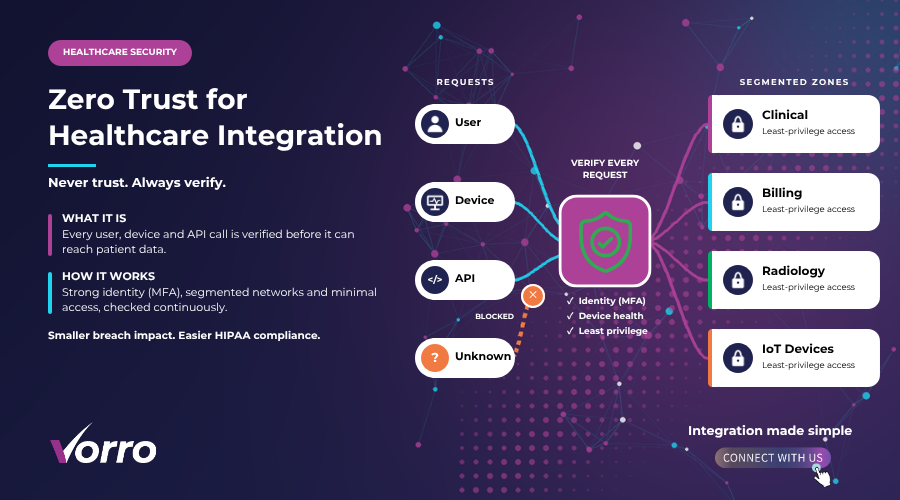
Role?based access control (RBAC) should be baked into every integration stage. A lab tech needs to see test results, not the entire billing ledger. Implement multi?factor authentication for any user who can pull or push PHI. And remember: if a user’s role changes, you must revoke old permissions within 24?hours – no excuses.
Audit Logging and Integrity Checks
Every read, write, or transformation must leave an immutable log. Store these logs in a write?once, read?many (WORM) bucket or a tamper?evident database. Include who, what, when, and where – that’s the data HHS looks for during a breach investigation. Pair logs with hash?based integrity checks so any file alteration triggers an alert.
BAAs and Vendor Responsibilities
Negotiating a Solid BAA
A Business Associate Agreement (BAA) is your contract that says the vendor will protect PHI the way HIPAA demands. Don’t settle for a generic line item. Insist on clauses that cover encryption standards, breach notification timelines, and audit rights. Ask the vendor to provide a copy of their own security policies – that’s how you verify they actually practice what they promise.
Vendor Risk Assessment Checklist
- Does the vendor have a current HIPAA audit report?
- Which encryption methods are used for data at rest and in transit?
- Are audit logs accessible to you in real time?
- Can you enforce RBAC on the vendor’s platform?
- What is the vendor’s incident response SLA?
- Do they offer tokenization or masking services?
Use this list as a scorecard. If a vendor ticks fewer than four boxes, keep looking – you deserve a partner who treats PHI like gold.
Risk Scoring for Integration Scenarios
Not every data flow is equally risky. I like to rate each integration touchpoint on a 1?5 scale for three factors: data sensitivity, exposure frequency, and control gaps. Multiply the three numbers and you get a risk score. For example, an API that pushes lab results (sensitivity?4, frequency?5, control gap?2) scores 40 – a red flag that demands extra encryption or a tokenization layer. This simple matrix helps you prioritize resources without guessing.
Continuous Monitoring and Incident Response
Compliance isn’t a set?and?forget task. Set up automated alerts that fire when log anomalies appear – say, a user downloading a full patient list at midnight. Feed those alerts into a ticketing system that routes the incident to your security ops team within five minutes. The response plan should include forensic capture, a breach notification draft, and a post?mortem checklist. When you automate the early steps, you shave precious time off the 60?day breach notification clock.
Compliance Automation Tools
There are a handful of platforms that take the grunt work out of proof?of?compliance. Here are three I trust:
- SecureLogPro – extracts audit logs from AWS, Azure, and GCP into a tamper?evident ledger and generates quarterly BAA evidence reports.
- PolicyGuard – lets you write security policies as code (think Terraform for compliance) and automatically checks your pipelines against them.
- DataMaskX – offers on?the?fly tokenization for streaming data, plus a dashboard that shows PHI exposure percentages in real time.
When you pair any of these tools with regular manual reviews, you get a compliance safety net that’s hard to breach.
A Security Evaluation Checklist
Before you sign off on a new integration, run through this quick checklist. It’s short enough to fit on a sticky note but thorough enough to catch the usual slip?ups.
- Map every data source and destination – know where PHI lives.
- Perform threat modeling – identify potential attack vectors.
- Run penetration testing on APIs and webhooks.
- Validate encryption at rest (AES?256) and in transit (TLS?1.3).
- Confirm RBAC and MFA are enforced for all service accounts.
- Check that audit logs are immutable and retained for at least six years.
- Review the BAA – ensure all required clauses are present.
- Score the integration using the risk matrix; remediate any score above 30.
- Set up continuous monitoring alerts for anomalous access patterns.
- Schedule a quarterly re?assessment – compliance is an ongoing journey.
Key Takeaways
Building HIPAA compliant data integration isn’t a one?time checkbox; it’s a blend of strong technical safeguards, ironclad contracts, and relentless monitoring. Encrypt everything, token?mask when you can, and keep tight access controls. Use a risk?scoring matrix to focus on the most vulnerable pipelines, and let automation handle logs and alerts so you can react fast. Finally, never skip a BAA review – the vendor’s commitment is as important as your own controls. Follow these steps, and you’ll have a secure healthcare integration that protects patients and keeps regulators happy.
FAQs
How do I know if my integration is HIPAA compliant?
Start with a data?flow diagram, check that every PHI element is encrypted, logged, and covered by a BAA. Then run the risk?scoring matrix; any score above 30 means you need additional safeguards.
What encryption should I use for data at rest?
AES?256 is the industry standard for PHI protection. Most cloud providers offer it out of the box for storage services, but verify the key?management policy is under your control.
Do I need a BAA for every cloud service?
Yes. Any service that stores, processes, or transmits PHI is a business associate. Even a logging tool that collects audit data needs a signed BAA vendor agreement.
How often should I audit my integration pipelines?
At minimum quarterly, but after any major change – new API, vendor switch, or policy update – you should run a full audit within 30?days.
Can automation replace manual compliance checks?
Automation can generate evidence, flag anomalies, and keep logs immutable, but a human review is still needed to interpret findings and adjust policies. Think of automation as a force?multiplier, not a replacement.