How Health Systems Can Leverage a SMART on FHIR App Directory
Introduction to SMART on FHIR Directories
What is SMART on FHIR
SMART on FHIR is a set of open standards that let third?party apps talk to any EHR that supports FHIR. It wraps OAuth 2.0 authentication around the FHIR REST API, so a developer can launch an app inside a clinician’s workflow with just a few clicks. In plain English, think of it as the “Google Play” of health IT—except every app is vetted to pull the right patient data securely.
Why health systems need a dedicated app directory
Imagine you’re part of a 1,200?bed academic medical center. Your clinicians stumble over 300 unrelated health apps, each with its own login page. Chaos, right? A dedicated SMART on FHIR app directory for health systems cuts through that noise, curates only the apps that match your clinical pathways, and keeps governance tight. It also gives IT a single pane of glass to monitor usage, security, and compliance.
Existing Ecosystem Overview
The SMART App Gallery
The SMART App Gallery is the public showcase where anyone can publish a SMART on FHIR app. It’s great for discovery, but it’s not tailored to the policies of a specific health system. Think of it as a town square versus a gated community—open, but with less control.
Vendor specific marketplaces
Epic’s App Orchard and Cerner’s Code can be useful, yet they lock you into a single vendor’s ecosystem. Azure Marketplace adds another layer, focusing on cloud?native solutions. The downside? Each marketplace pushes its own terms, so you end up juggling multiple contracts and security reviews. That’s why many large systems prefer to build their own directory.
Designing Your Health System Specific Directory
Defining scope and target user groups
First, ask yourself: who will actually browse this directory? Is it physicians in the ICU, nurses on the floor, or patient?facing portals? Map those personas to concrete use cases—e.g., “quick sepsis risk calculator” for ICU docs or “appointment scheduler” for outpatient staff. A clear scope prevents scope creep later.
Selecting and categorizing apps
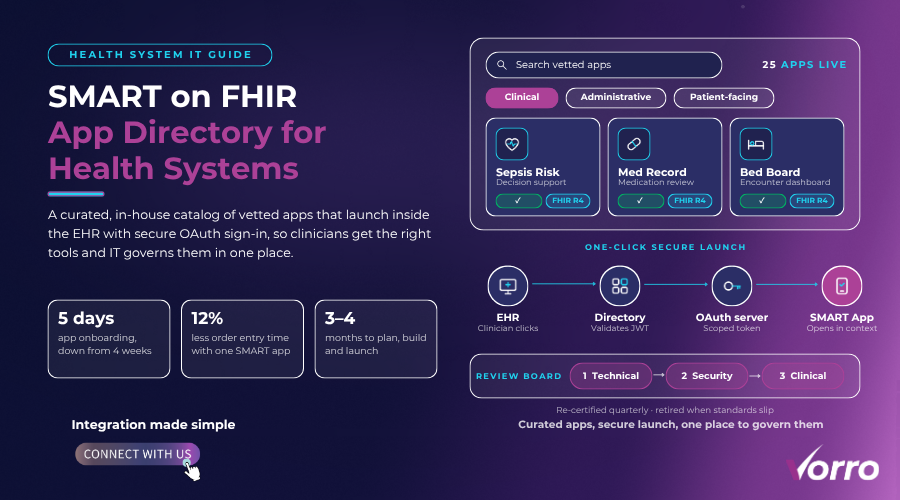
Group apps into clinical, administrative, and patient?facing buckets. Within clinical, you might have sub?categories like imaging, decision support, and chronic disease management. Tag each app with metadata such as FHIR version, required launch context, and HIPAA compliance level. That metadata fuels search filters and helps auditors verify that every app meets your security baseline.
Technical Implementation
FHIR server configuration and .well-known/smart-configuration
The heart of any directory is the discovery document at /.well-known/smart-configuration. It tells apps where to find your FHIR endpoint, which OAuth scopes are available, and the launch URLs. Make sure the document is served over HTTPS and, for best practices, refer to our guide on choosing the right FHIR data integration platform, which also covers including the “token_endpoint” and “registration_endpoint,” and listing all supported FHIR resources. A quick curl test can confirm it’s reachable before you go live.
OAuth 2.0 and launch context for secure access
Set up an authorization server that issues short?lived access tokens tied to a user’s role. Use the “patient” or “encounter” launch context depending on the app’s needs. For example, a medication reconciliation app will request patient/*.* while a bed?management dashboard might need encounter/*.*. Remember to log token issuance for audit trails.
Integration points with EHRs and portals
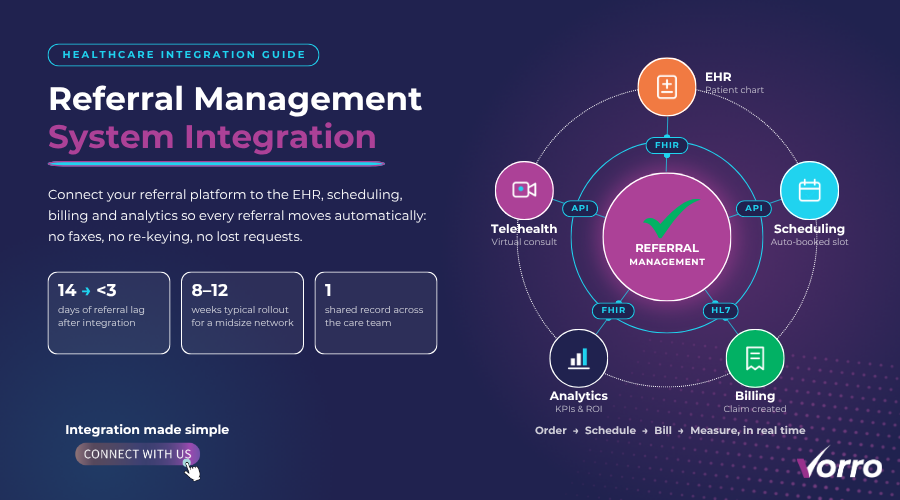
Most EHRs expose a “launch URL” that you can embed inside your directory UI, a strategy detailed in our scalable EHR integration solutions guide. When a clinician clicks an app, the EHR passes a JWT containing the user’s identity and the current patient context. Your directory should capture that launch request, validate the JWT, then redirect the user to the app’s launch endpoint. The flow is seamless—no extra password prompts.
Governance and Curation
Review workflow security vetting and compliance checks
Build a three?stage review board: (1) technical feasibility, (2) security assessment, and (3) clinical relevance. Use a checklist that includes penetration testing, data residency verification, and HIPAA Business Associate Agreement (BAA) confirmation. If an app fails any step, send it back for remediation before it ever lands in the directory.
Ongoing app lifecycle management
Apps aren’t static. Schedule quarterly re?certifications, track version updates, and retire any app that no longer meets your standards. An automated alert can ping the app vendor when a new FHIR release drops—say, from R4 to R5—so you can evaluate impact before users feel a hiccup.
Monetization and Partnership Models
Vendor licensing revenue sharing and sponsorship
Not every health system wants the directory to be a cost center. You can negotiate revenue?share deals where a vendor pays a modest fee for each active user. Alternatively, sponsor a “highlighted app” slot—think of it as a billboard inside your internal marketplace. Both models fund ongoing maintenance and give vendors an incentive to keep their apps up to date.
Measuring Success
Adoption metrics clinician satisfaction ROI
Track the number of unique users per month, average session length, and the top?10 most launched apps. Pair those numbers with clinician satisfaction surveys—ask, “Did the app save you time today?” A concrete ROI example: a regional network saw a 12% reduction in order entry time after deploying a SMART?based order?set app, translating to roughly $450,000 in annual savings.
Case Study A Health System’s Directory Rollout
Challenges solutions outcomes
Midwest Health, a 900?bed system, struggled with fragmented app adoption across its three hospitals. They launched a SMART on FHIR app directory in six months, starting with 25 vetted apps. The biggest hurdle was aligning security policies across legacy EHR modules. By creating a unified OAuth server and a cross?departmental governance board, they cut onboarding time from 4 weeks to 5 days per app. Six months later, usage climbed to 2,300 unique clinician sessions per week, and readmission rates for heart failure dropped by 8% thanks to a new predictive analytics app.
Future Trends and Best Practices
Patient generated data apps AI integration interoperability roadmaps
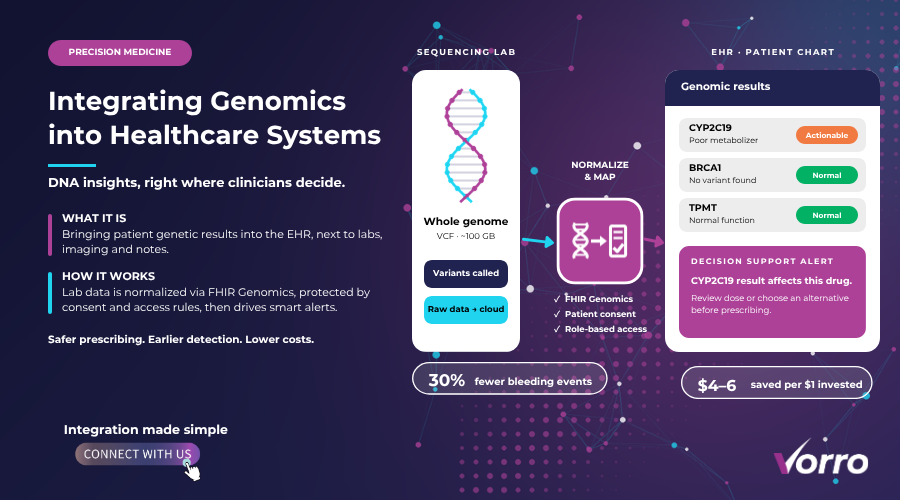
The next wave will see wearables feeding data directly into SMART on FHIR apps, letting clinicians see real?time activity scores alongside lab results. Artificial intelligence modules will consume that stream to generate risk alerts at the point of care. To stay ready, design your directory with version?agnostic metadata and keep an eye on emerging FHIR extensions for genomics and social determinants of health.
Quick Start Checklist
10 point implementation checklist for IT teams
- Define user personas and app categories.
- Draft a governance charter and assemble a review board.
- Provision a FHIR server with R4 compliance.
- Publish
/.well-known/smart-configurationwith correct endpoints. - Set up an OAuth 2.0 authorization server and define launch contexts.
- Integrate launch URLs into your primary EHR.
- Create a metadata schema for app submissions.
- Run security and compliance checks on each app.
- Establish a revenue or sponsorship model if needed.
- Launch, monitor adoption metrics, and schedule quarterly reviews.
Building a SMART on FHIR app directory for health systems isn’t a sprint; it’s a marathon with clear checkpoints. By grounding your effort in solid governance, thoughtful technical design, and measurable outcomes, you give clinicians the right tools at the right time—without drowning in a sea of unchecked apps. The payoff? Faster workflows, happier staff, and a healthier bottom line.
Frequently Asked Questions
How does a SMART on FHIR app directory differ from public marketplaces like Epic or Cerner?
A SMART on FHIR app directory is a curated, health?system?specific catalog that integrates with the organization’s EHR and identity infrastructure, while public marketplaces such as Epic or Cerner provide vendor?managed listings that may not align with internal policies or custom workflows. The private directory gives the health system control over app selection, security standards, and user access.
What are the key steps to govern a health?system?specific SMART on FHIR app directory?
Governance involves defining approval criteria, establishing a review board, implementing version control, and setting up monitoring for usage and security incidents. Documented policies and automated compliance checks help maintain consistency across the catalog.
How can health systems ensure security and compliance when onboarding apps to a SMART on FHIR directory?
Each app should undergo a security assessment, validate OAuth2 scopes, and meet HIPAA and local regulatory requirements before inclusion. Sandbox testing, continuous vulnerability scanning, and enforcing least?privilege access tokens further protect patient data.
What role does the SMART App Gallery play in building a private app directory?
The SMART App Gallery provides a community?driven repository of open?source and commercial SMART on FHIR apps that can serve as a source of candidates for a private directory. It offers standardized metadata and sandbox environments that simplify initial evaluation and integration.
How long does it typically take to plan, build, and launch a SMART on FHIR app directory?
Planning and requirement gathering usually take 4–6 weeks, development and integration another 8–12 weeks, and testing plus rollout add 2–4 weeks, so most health systems can launch in 3–4 months. Timelines may vary depending on existing IT resources and the number of apps to be cataloged.